The decision on whether to play Stardew Valley on mobile or PC is a tough one, or at least it was for me. Personally, I use my PC for work, and I didn’t want to sit in front of a monitor more than I already did, but also games are usually better on PC, so I really struggled with this for a while.
In the end, mobile won due to low price and overall enjoyment of cozying up in a blanket on my favorite chair. But then a few months later, Steam had a sale of Stardew and I managed to get the PC version for a bargain, so I ended up playing both versions.
And if you’ve yet to decide if you should play Stardew Valley on mobile or PC, I’m here to tell you the difference and help you choose based on what you’d enjoy more.
A quick note on price
Okay, so straight upfront — Stardew Valley is cheaper on mobile most of the time. So if you’re on a tight budget, this is good info to have. On Steam and PlayStation, it usually costs around $15, and you can get it on Google Play Store and App Store for $5. I mean, in this economy, this is quite a difference.
But it’s also good to know that when it goes on sale, Stardew is cheap. I got it for like $3 on Steam.
To be perfectly honest, even its regular price is too low for how much content you actually get. This is years of gameplay we’re talking about, and a continuously updated experience. Meanwhile AAA companies will charge you like $80 for 20 hours of mid gameplay. So you can see how Stardew is definitely worth it.
Then again, I understand being strapped for cash and wanting something very badly, so my recommendation is this:
- If budget is an issue and you don’t want to wait for a sale — get it on mobile (the differences are miniscule).
- If budget is an issue but you are a patient person (cannot be me) — get it on PC.
- If budget is not an issue, read on!
Graphics and visuals
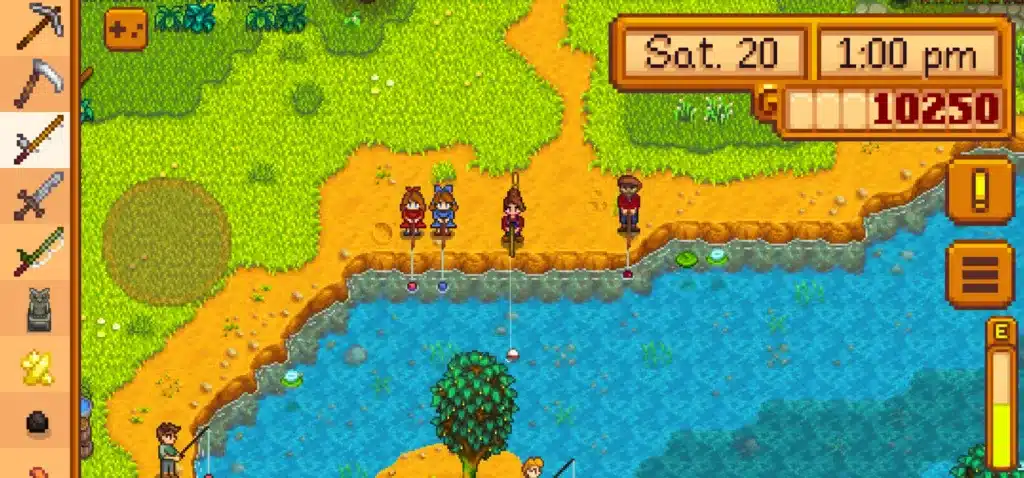
If you’re worried about the graphics looking worse on mobile, don’t be! Stardew Valley’s pixel art style works well across platforms and you won’t see a noticeable difference between the two. I played both versions extensively and I can’t say I’ve seen any issues. The mobile version lets you zoom in and out, so you can easily get to everything, and everything always looks very smooth and polished.
Controls and feel
This is where the biggest difference lies, for me at least. The controls are quite a bit different from mobile to PC, though you can adjust the controls on mobile as you wish. On my phone, I used the big controller circle to move my character around, and it was a bit annoying, I have to say, when I would get to a transition area (from farm to town, for example) and would have to move the circle somewhere else in order to transition.
Switching between tools is not that hard, though. You just need to tap them and you’ve got them, and same goes for foraging and interacting with various things like the task board, shopping, etc. Fishing took some effort because I couldn’t figure it out at first, but I daresay it’s easier to do on mobile.
Now, after this, the PC took some getting used to. It’s as simple as WASD but I struggled quite a lot at first, clicking on the screen to move my character around when I wasn’t supposed to. This is how I ended up cutting down a lot of my vegetables — I would click on them to move towards them, and end up swinging my axe.
Interacting with items was also difficult at first, but I got used to that quickly. Fishing, as I mentioned, is not easy at all on PC. I struggled so hard to catch a fish, couldn’t figure out what to do for a long time. Eventually I got it, but not before missing many events and tasks.
Now, if you’ve never played either, you won’t have similar issues. I’d say both are very intuitive, with the PC winning out for me slightly just because I ended up enjoying it more. Maybe it’s my sensory issues — I dislike sliding my finger across the phone screen too many times. You can also adjust your controls on mobile to be whatever you want them to be (circle or no circle), but I just like having that guide there.
Mobile also allows you to auto-save (which I didn’t know) whenever you switch out of the screen. You can also auto-select your tools (just approach an item and the game will select the right tool for it automatically). I also didn’t know that, but it’s a great quality of life update (this is not possible on PC/consoles). You can also auto-swing your sword in the mines.
So on controls alone, mobile wins out, but personally, I still preferred the PC version in this regard, it was just nicer for me.
Gameplay — is anything missing?
So, before you choose, it’s good to know what’s missing from the gameplay on mobile. Here’s what you’ll miss out on:
- Multiplayer co-op
- Modding
- Updates come a little later to mobile (like a month maybe, in the past)
But that’s pretty much it. If you’re not planning to use either or don’t care about getting updates immediately, you won’t really notice a difference. The gameplay is entirely the same across platforms.
The only thing I liked more on PC that I couldn’t quite figure out on mobile is the pausing — on PC you can just go to another screen and the game will pause automatically. On mobile I felt like I had to keep playing until nighttime no matter what because I didn’t know how to pause in the middle of the day. But that could just be me and my own stupidity.
One note re: modding — I feel like you have to check out all the mods available before you decide because I’ve seen some fantastic ones, and you might want the option in the end. Stardew Valley has a really active modding community on NexusMods and you might miss out, especially if you want to be able to expand and change the game. I’ve even seen a BG3 mod with Astarion becoming a romanceable character, which is just peak player creativity if you ask me. If you’re not sure how to get started with mods, I have a guide to safe modding here.
Performance and stability
I’ve played hundreds of hours of Stardew Valley on both mobile and PC, and I can confidently tell you that there are no performance issues. I didn’t have a single lag, bug or something breaking either on mobile or PC. My phone didn’t even heat up and that’s a big win because the phone I played it on was old (I got a new one recently, thank you for your concern).
So if you’re concerned about performance issues, don’t be! Stardew works just as well on mobile as it does on PC.
The “on the go” factor
Stardew Valley mobile has one huge advantage here — you can play it absolutely anywhere and keep it with you at all times. Bathroom break at work? Stardew! A few minutes free before sleep? Stardew! Casually watching a TV show? Stardew! It’s really great to be able to escape into that world whenever you feel like it, and especially great to be able to play it in a comfy chair or bed. So, points mobile!
Verdict — which should you choose?
To be perfectly honest, you can’t go wrong with either. Stardew Valley works wonderfully across platforms, so your decision is entirely personal. But to help you out, here are my thoughts:
- If you’re on a tight budget, get the game on mobile. It’s just $5 on Play Stores, and with an Apple Arcade subscription, the game is entirely free (though, you know, you have to get the subscription).
- If you like auto-play type controls more, get it on mobile.
- If you want to mod the game or play with friends, I recommend getting it on PC.
- If you care about getting the updates immediately, get it on PC.
- If you dislike playing games on mobile in general, PC is a better option (obviously).
- If you plan to play the game on the go and like not having to set a dedicated time for playing, get it on mobile.
- If you don’t care either way, and just want to know which version is better — PC is my personal preference just because I really enjoyed playing it there, but mobile is also great and easily accessible.